

Overview
Proxy agents connect agents running on different buses. Unlike distributed agents (which all share the same bus), proxy agents bridge two isolated bus instances point-to-point. This is useful when:- You want to run an LLM agent on a separate server without shared infrastructure
- You need fine-grained control over which messages cross the network
- You’re connecting to a third-party service that hosts agents
Architecture
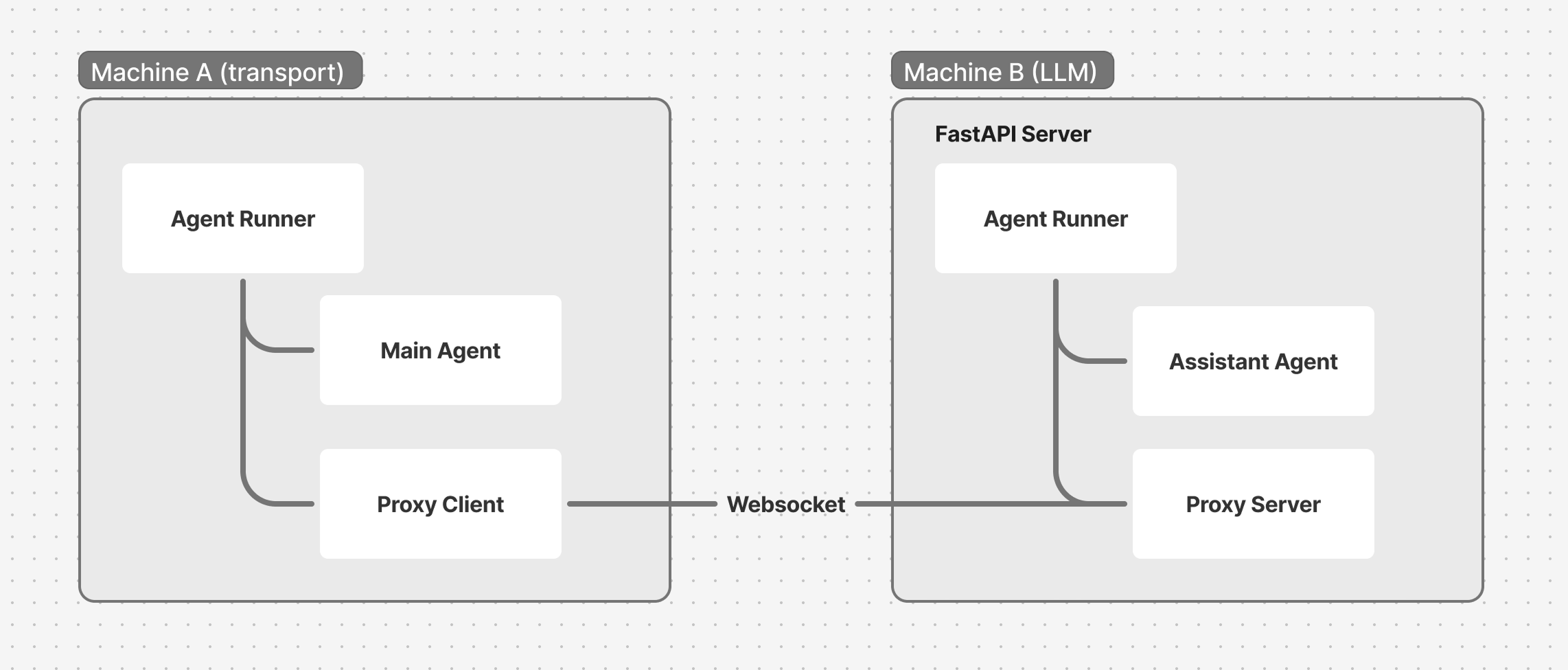
WorkerRunner and bus. The proxy agents relay messages between the two buses over a WebSocket connection. Like any worker, a proxy gets its bus from the runner when you register it — you never pass bus= to its constructor.
Client side: WebSocketProxyClient
The client connects to a remote server and forwards specific message types:
The proxy connects when activated. Activate it when the client connects, by calling
activate_worker on the main agent:
Server side: WebSocketProxyServer
The server accepts WebSocket connections and creates a proxy for each session:WorkerRunner, bus, and set of agents. This isolates sessions from each other.
Message filtering
Proxy agents provide security through message filtering:- Only messages targeted at the configured agent names cross the connection
- Broadcast messages (no target) are not forwarded
- Local-only messages (
BusLocalMessage) never cross forward_messagescontrols which message types are allowed
Full example
Client (main.py)
Server (assistant.py)
Running
Install the WebSocket extra:
uv add "pipecat-ai[websocket]"Proxy agents vs distributed agents
What’s next
You’ve built a multi-agent system and scaled it across processes, machines, and networks. Here’s where to go from here.What's Next
Explore Fundamentals and advanced patterns